> For the complete documentation index, see [llms.txt](https://doc.lockerprotocol.com/llms.txt). Markdown versions of documentation pages are available by appending `.md` to page URLs; this page is available as [Markdown](https://doc.lockerprotocol.com/vault/master-password.md).
# Create your master password
One strong password protects everything stored in the Vault.
Everything the Vault stores (your secret phrases, your keys, your settings) is encrypted with this password. Without it, the data on the device is unreadable.
## What you need
* The Vault, open on the welcome page.
* A password you can remember. The Vault **cannot reset it**: forgetting it means erasing the device and restoring from your paper backup.
{% stepper %}
{% step %}
### Tap "Create My Master Password"
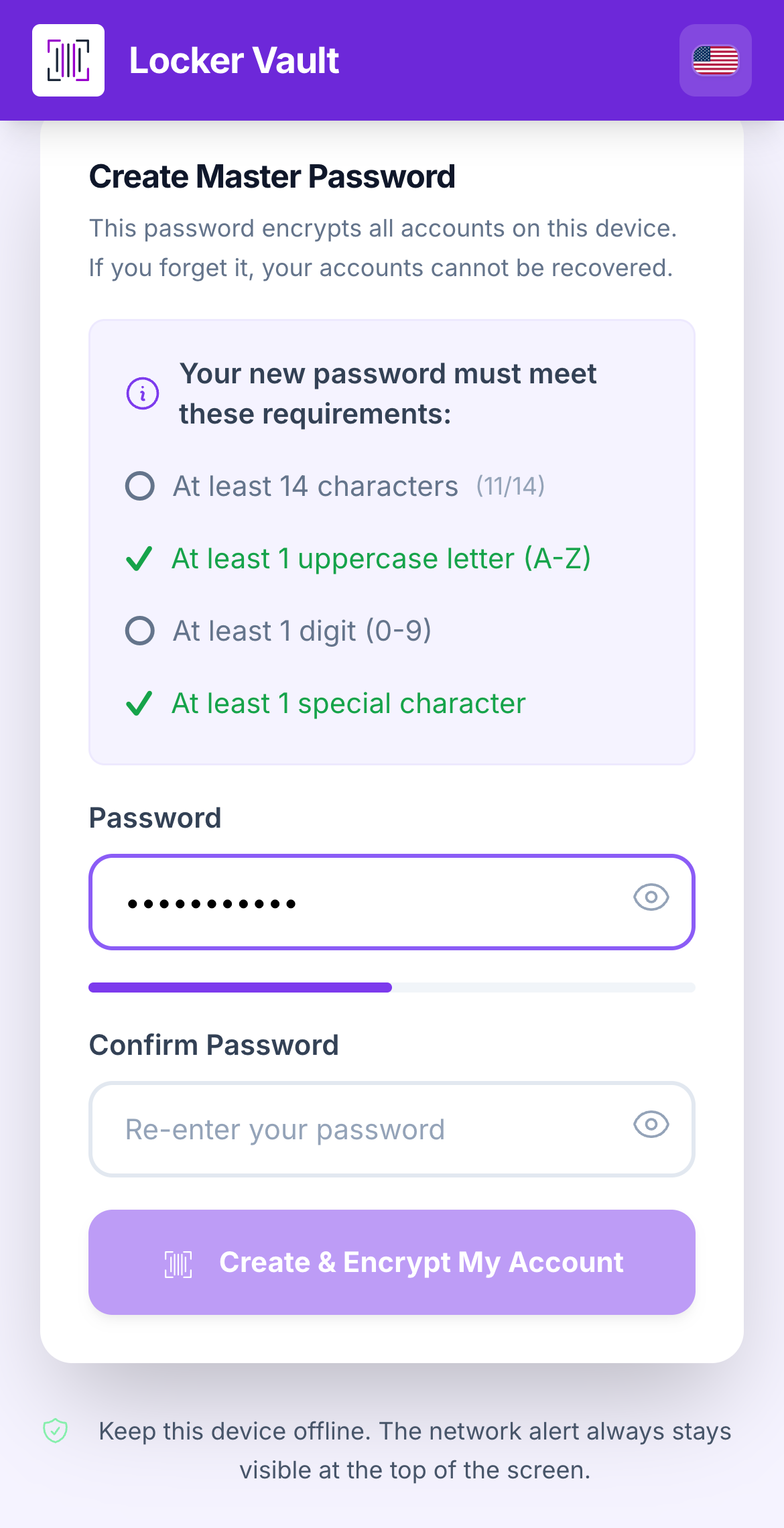
On the welcome page, tap **Create My Master Password**. The screen **Create Master Password** opens.
The password screen and its four requirements.
Your password must have:
* at least **14 characters**,
* at least **1 uppercase letter** (A–Z),
* at least **1 digit** (0–9),
* at least **1 special character** (like `!` or `#`).
A short sentence works well: `Blue-turtle-eats-42-pancakes!` is long, easy to remember and hard to guess.
{% endstep %}
{% step %}
### Type it twice, then tap "Create & Encrypt My Account"
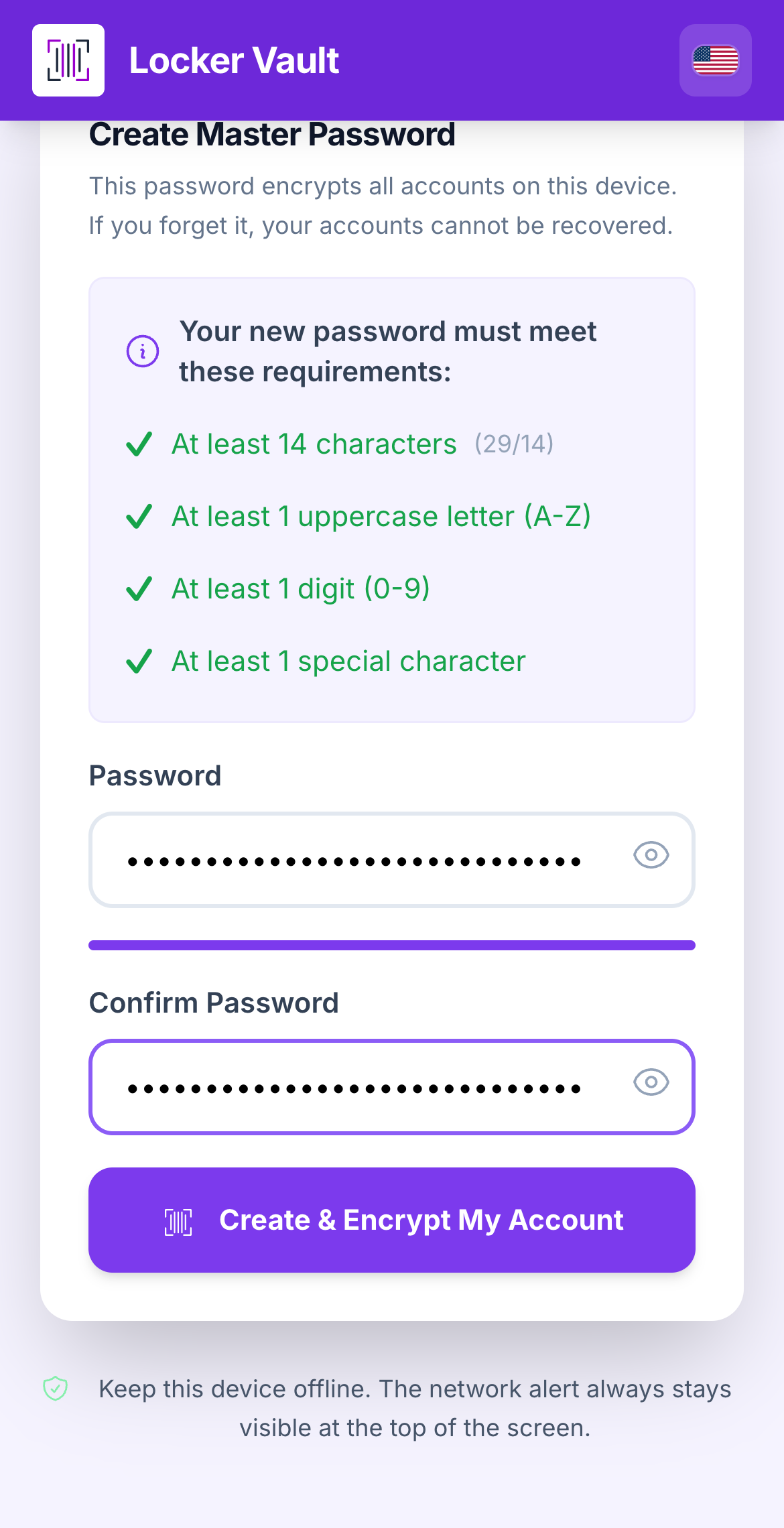
Enter the password, enter it again under **Confirm Password**, and tap **Create & Encrypt My Account**. A green **Password created successfully!** toast appears.
All four requirements green: tap Create & Encrypt My Account.
{% endstep %}
{% endstepper %}
{% hint style="info" %}
**What you see:** the welcome page marks the **Password** step as done and moves you to **Account**.
{% endhint %}
{% hint style="warning" %}
**Two things to know**
* After **50 wrong attempts in a row** the Vault erases itself. That is on purpose: a thief cannot guess forever. Your paper backup lets you start again.
* You can change the password later in **Configuration → Master Password**, and choose how fast the Vault auto-locks in [Security settings](/vault/security-settings.md).
{% endhint %}
## Learn more
* [Create a new account](/vault/add-an-account/create-a-new-account.md), the next step.
* [Change the master password](/vault/change-the-master-password.md)
* [Lock screen & forgot password](/vault/lock-screen-and-reset.md)
---
# Agent Instructions
This documentation is published with GitBook. GitBook is the documentation platform designed so that both humans and AI agents can read, navigate, and reason over technical content effectively. Learn more at gitbook.com.
## Querying This Documentation
If you need additional information that is not directly available in this page, you can query the documentation dynamically by asking a question.
Perform an HTTP GET request on the current page URL with the `ask` query parameter, and the optional `goal` query parameter:
```
GET https://doc.lockerprotocol.com/vault/master-password.md?ask=&goal=
```
`ask` is the immediate question: it should be specific, self-contained, and written in natural language.
`goal` is optional and describes the broader end goal you are ultimately trying to accomplish on behalf of the user. GitBook uses it to tailor the answer towards what is most useful for that goal.
The response will contain a direct answer to the question and relevant excerpts and sources from the documentation.
Use this mechanism when the answer is not explicitly present in the current page, you need clarification or additional context, or you want to retrieve related documentation sections.