> For the complete documentation index, see [llms.txt](https://doc.lockerprotocol.com/llms.txt). Markdown versions of documentation pages are available by appending `.md` to page URLs; this page is available as [Markdown](https://doc.lockerprotocol.com/vault/accounts-overview.md).
# Accounts overview
The home screen lists every account the Vault holds.
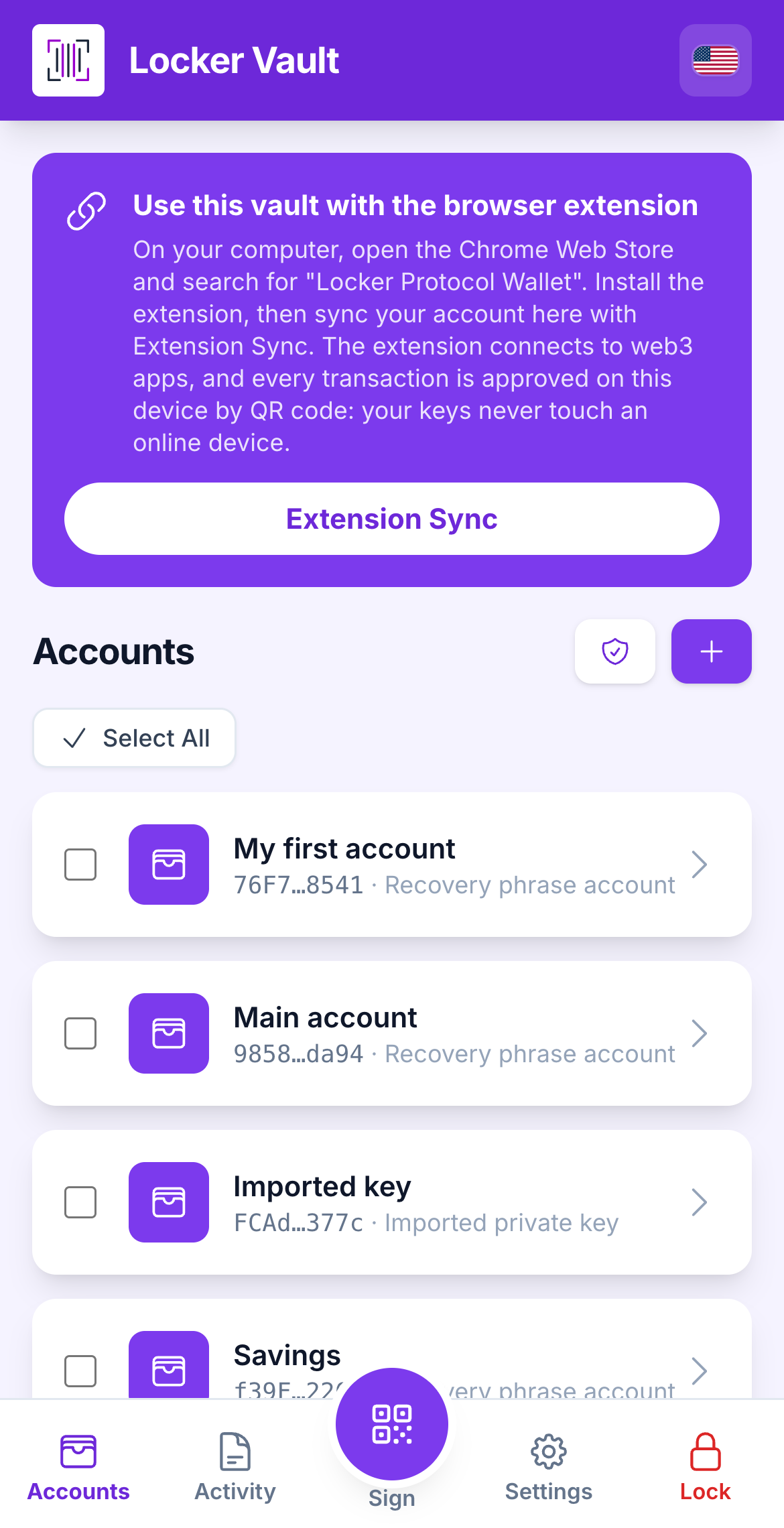
After the password, the Vault opens on **Accounts**. Each account is a card. Tap a card to open it, or tap **Add** to create or import one.
## What you need
* The Vault, unlocked.
{% stepper %}
{% step %}
### The account cards
Each card shows the account's name and a short version of its address.
The bottom bar has five slots. From left to right: **Accounts**, **Activity**, the **Sign** button (a raised round violet QR button in the middle: one tap opens the camera, because scanning is what the Vault is for), then **Settings** and **Lock**. Lock is drawn in red, so it never reads as one more tab.
Until your first sync, a violet banner at the top of the screen explains how to use the Vault with the browser extension. Once you have synced once it disappears, and the violet **Extension Sync** card on the accounts list stays as the way back.
The Accounts screen with two accounts.
{% endstep %}
{% step %}
### The three kinds of account
A small badge on each card tells you where it came from:
* **Recovery phrase account**: made from 12 or 24 words. It has an address on every supported chain.
* **Imported private key**: a single Ethereum-style key. Works on Ethereum and Tron, not on Solana, Sui or Stellar.
* **Single-network key**: a key for one chain only (for example a Solana keypair or a Bitcoin WIF).
The badge shows the kind of account.
{% endstep %}
{% endstepper %}
{% hint style="info" %}
**Which one should I use?** A *recovery phrase account* is the normal choice: one phrase, all chains, one paper backup. The other kinds exist so you can bring in keys you already own.
{% endhint %}
## Learn more
* [Add an account](/vault/add-an-account.md)
* [Account detail](/vault/account-detail.md)
* [Your addresses](/vault/your-addresses.md)
* [Sync with the browser extension](/vault/sync-with-the-extension.md)
---
# Agent Instructions
This documentation is published with GitBook. GitBook is the documentation platform designed so that both humans and AI agents can read, navigate, and reason over technical content effectively. Learn more at gitbook.com.
## Querying This Documentation
If you need additional information that is not directly available in this page, you can query the documentation dynamically by asking a question.
Perform an HTTP GET request on the current page URL with the `ask` query parameter, and the optional `goal` query parameter:
```
GET https://doc.lockerprotocol.com/vault/accounts-overview.md?ask=&goal=
```
`ask` is the immediate question: it should be specific, self-contained, and written in natural language.
`goal` is optional and describes the broader end goal you are ultimately trying to accomplish on behalf of the user. GitBook uses it to tailor the answer towards what is most useful for that goal.
The response will contain a direct answer to the question and relevant excerpts and sources from the documentation.
Use this mechanism when the answer is not explicitly present in the current page, you need clarification or additional context, or you want to retrieve related documentation sections.