> For the complete documentation index, see [llms.txt](https://doc.lockerprotocol.com/llms.txt). Markdown versions of documentation pages are available by appending `.md` to page URLs; this page is available as [Markdown](https://doc.lockerprotocol.com/browser-extension/hyperliquid-perps.md).
# Hyperliquid perps
Trade perpetual futures on Hyperliquid, still signing on the Vault.
**Perps** lets you trade perpetual contracts on Hyperliquid from the wallet. Money moves (deposit, withdraw, HYPE transfers) are signed on your Vault. Orders use a short-lived *trading agent* key, so you do not run a QR loop for every click.
{% hint style="danger" %}
**Leverage trading involves risk.** *Hyperliquid perpetual contracts are leveraged products: you can lose your entire deposit.* Availability depends on where you live. Nothing in this section is financial advice.
{% endhint %}
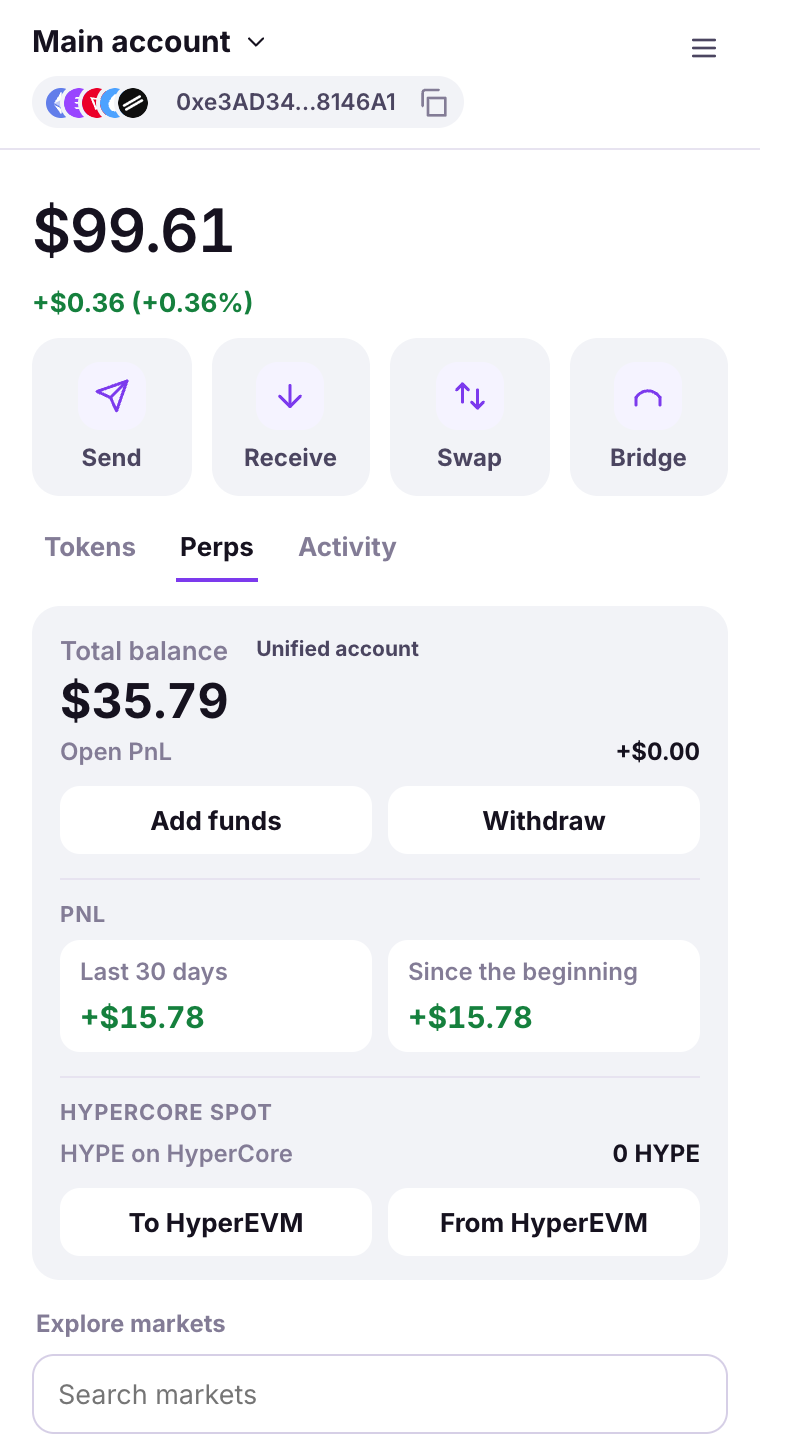
The Perps tab: the balance card, then the markets.
## The balance card
One card, three blocks, each with one job:
1. **The account** — your **Total balance**, the **Unified account** chip, the **Open PnL** of every position across every DEX right under the figure, and the two money buttons **Add funds** and **Withdraw**.
2. **PnL** — two tiles from Hyperliquid's own portfolio windows: **Last 30 days** and **Since the beginning**.
3. **HyperCore spot** — the **HYPE on HyperCore** you hold, with the two legs of the HyperEVM bridge: **To HyperEVM** and **From HyperEVM**.
Below the card, **Positions** and **Open orders** show the three most recent, with **See all (n)** opening the full sheet.
## Getting started, in order
1. **Fund your address** (ETH + USDC on Arbitrum) — ETH for transaction fees, at least 5 USDC to deposit.
2. **Add funds on Hyperliquid** — signed on the Vault. See [Deposit & withdraw](/browser-extension/hyperliquid-perps/deposit-and-withdraw.md).
3. **Activate trading** — creates the [agent key](/browser-extension/hyperliquid-perps/agent-key.md) with one Vault scan. *A Locker commission per order is always shown on the order summary before you sign.*
Then: [Markets & watchlist](/browser-extension/hyperliquid-perps/markets-and-watchlist.md) → [Place an order](/browser-extension/hyperliquid-perps/place-an-order.md) → [Positions & alerts](/browser-extension/hyperliquid-perps/positions-and-alerts.md).
{% content-ref url="/pages/UnNu3U29QEc1RF8D82fl" %}
[The agent key](/browser-extension/hyperliquid-perps/agent-key.md)
{% endcontent-ref %}
{% content-ref url="/pages/vj1JMxWFFYL5Wjggj1h2" %}
[Deposit & withdraw USDC](/browser-extension/hyperliquid-perps/deposit-and-withdraw.md)
{% endcontent-ref %}
{% content-ref url="/pages/LMH7r3F7CESyoABYVh5d" %}
[HYPE between HyperCore and HyperEVM](/browser-extension/hyperliquid-perps/hype-and-hyperevm.md)
{% endcontent-ref %}
{% content-ref url="/pages/59axEaQK3Dco44KPxA2K" %}
[Markets, watchlist & order book](/browser-extension/hyperliquid-perps/markets-and-watchlist.md)
{% endcontent-ref %}
{% content-ref url="/pages/NyLjFIH7YNTQkU2iYRxk" %}
[Place an order](/browser-extension/hyperliquid-perps/place-an-order.md)
{% endcontent-ref %}
{% content-ref url="/pages/iC8ujjGmu92pxoAD3odN" %}
[Positions & alerts](/browser-extension/hyperliquid-perps/positions-and-alerts.md)
{% endcontent-ref %}
{% content-ref url="/pages/RcL8ESH0mo4wzt0qnPPv" %}
[Transfer margin to a DEX](/browser-extension/hyperliquid-perps/transfer-to-a-dex.md)
{% endcontent-ref %}
---
# Agent Instructions
This documentation is published with GitBook. GitBook is the documentation platform designed so that both humans and AI agents can read, navigate, and reason over technical content effectively. Learn more at gitbook.com.
## Querying This Documentation
If you need additional information that is not directly available in this page, you can query the documentation dynamically by asking a question.
Perform an HTTP GET request on the current page URL with the `ask` query parameter, and the optional `goal` query parameter:
```
GET https://doc.lockerprotocol.com/browser-extension/hyperliquid-perps.md?ask=&goal=
```
`ask` is the immediate question: it should be specific, self-contained, and written in natural language.
`goal` is optional and describes the broader end goal you are ultimately trying to accomplish on behalf of the user. GitBook uses it to tailor the answer towards what is most useful for that goal.
The response will contain a direct answer to the question and relevant excerpts and sources from the documentation.
Use this mechanism when the answer is not explicitly present in the current page, you need clarification or additional context, or you want to retrieve related documentation sections.