> For the complete documentation index, see [llms.txt](https://doc.lockerprotocol.com/llms.txt). Markdown versions of documentation pages are available by appending `.md` to page URLs; this page is available as [Markdown](https://doc.lockerprotocol.com/agent-wallet/agent.md).
# What the agent wallet is
An AI agent trades for you on Hyperliquid, under limits you sign, while your keys stay in the Vault.
**Locker Protocol Agentic** is the third app of the family. It is a command line called `lpa`: a wallet an AI agent can use, for perpetual futures on Hyperliquid, while the key that owns the money stays in your offline Vault.
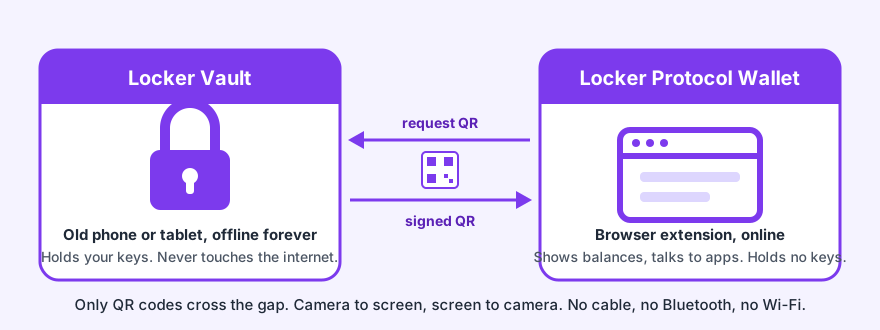
The Vault is the safe. The browser extension is the window. `lpa` is the trader who works for you, and who is never given the key to the safe.
{% hint style="danger" %}
**Perpetual futures are leveraged. You can lose everything you put in.** Nothing here is financial advice, and no part of this product promises that a trade, a method or a model makes money. Use an account that holds only what you are ready to lose.
{% endhint %}
## The problem
An AI agent that trades needs to sign orders. The easy way is to hand it a private key.
That is a disaster waiting to happen. A private key on a trading machine can be read by any program on it, sent anywhere, and used to empty the account. It never expires. Nobody holds the agent to a rule, because the key answers every request the same way.
## The answer
Four pieces, each doing one job.
1. **An agent key, not your key.** `lpa` makes a second key on your computer. Hyperliquid lets that key trade for your account, and refuses it every withdrawal and every transfer to another account. It is sealed on disk under a password you choose, and it expires on its own: 180 days at most, which is the longest Hyperliquid allows.
2. **A mandate you sign on the phone.** The limits the agent trades within are shown on the Vault, one row per limit, and you sign them there. The agent never widens them, because widening would need your phone again.
3. **The guardian.** A small background process holds the agent key in memory, checks every order against your limits a second time, and signs a closed list of trading actions only. It never gives the key, or your password, to whatever asked.
4. **The code applies the limits.** The size of a position, the distance between its steps, the exit price: the code computes them from your settings. The model decides the side, the market and the entry. It never decides how much.
The same rule as the extension: only QR codes cross, never a key.
## Who signs what
| What | Signed by | Where |
| --------------------------------------------- | ---------------------------------- | -------------------------------------------------- |
| Markets, quotes, positions, balances | nobody | public reads of Hyperliquid and Arbitrum |
| Paper orders | nobody | simulated on your computer, on the live order book |
| Open, close, cancel, change leverage | the agent key, inside the guardian | after the quote, the limits and your go |
| Approving the agent key, revoking it | **Locker Vault** | QR loop, on the phone |
| Deposit, withdraw, move margin between venues | **Locker Vault** | QR loop, on the phone |
| The mandate (the agent's limits) | **Locker Vault** | QR loop, on the phone |
| A copy's orders, a pilot's orders | the agent key, inside the guardian | under the policy and the mandate |
## What it can do
* Read markets, order books, funding, your positions and your balances.
* Place, change and cancel orders on Hyperliquid perps, within your limits.
* Trade a **paper account** that fills on the real order book with the real fees, with no key, no Vault and no money.
* Copy a trader's orders, on paper or, under a mandate that names that trader, for real.
* Run a **pilot** that decides on its own, on paper by default.
* Answer an AI agent in another program, through its MCP server, with the same limits and the same refusals.
## What it cannot do
* Withdraw your funds. Hyperliquid refuses the agent key every withdrawal and every transfer to another account, and the guardian signs nothing but trading actions.
* Move money at all without your phone. Deposits, withdrawals and transfers between venues are signed on the Vault.
* Widen its own limits. The guardian reads the mandate again before every opening, and a wider local limit waits for your password.
* Trade when the guardian is locked. `lpa lock` takes the key out of memory, and then nothing can be signed.
{% hint style="warning" %}
**The honest limit.** A program that steals the sealed key file *and* your password can talk to Hyperliquid without `lpa`, and no file on your computer stops it. What still holds then: it cannot withdraw, the key expires, and a dedicated account holds only what you are ready to risk. Use an account for this and nothing else.
{% endhint %}
## What it costs
| Cost | How much |
| ---------------------------- | ------------------------------------------------------------------------------------------------------------------------------------------------------------------------------------- |
| Hyperliquid's trading fees | the venue's own rate for your account's tier |
| The Locker service fee | 0.05 % of each order's notional, named in every quote and totalled in the journal. It applies only once your phone approved it; without that approval orders simply go out without it |
| Withdrawing from Hyperliquid | a flat 1 USDC, charged by Hyperliquid |
| The model | what your provider charges for the words the pilot or the assistant sends. A model on your own machine costs nothing but electricity |
| `lpa` itself | nothing |
Fees are always shown as one total, before anything is signed. See [Models and costs](/agent-wallet/models-and-costs.md) for the model's side of the bill.
## Where to start
{% content-ref url="/pages/HXBI3R531B7YnkiBITr9" %}
[Install lpa](/agent-wallet/install.md)
{% endcontent-ref %}
{% content-ref url="/pages/nRfL9FELnOtsSvqYFtmu" %}
[Set up in a few steps](/agent-wallet/set-up-in-steps.md)
{% endcontent-ref %}
{% content-ref url="/pages/eYPGBWyBR2RmHsNLud1E" %}
[Safety rules for the agent wallet](/agent-wallet/safety-rules.md)
{% endcontent-ref %}
## Learn more
* [How it trades](/agent-wallet/how-it-trades.md), the method in plain words.
* [The mandate](/agent-wallet/mandate.md), the limits your phone signs.
* [The guardian and the keys](/agent-wallet/guardian-and-keys.md).
* [Command reference](/agent-wallet/commands.md), every command and every flag.
---
# Agent Instructions
This documentation is published with GitBook. GitBook is the documentation platform designed so that both humans and AI agents can read, navigate, and reason over technical content effectively. Learn more at gitbook.com.
## Querying This Documentation
If you need additional information that is not directly available in this page, you can query the documentation dynamically by asking a question.
Perform an HTTP GET request on the current page URL with the `ask` query parameter, and the optional `goal` query parameter:
```
GET https://doc.lockerprotocol.com/agent-wallet/agent.md?ask=&goal=
```
`ask` is the immediate question: it should be specific, self-contained, and written in natural language.
`goal` is optional and describes the broader end goal you are ultimately trying to accomplish on behalf of the user. GitBook uses it to tailor the answer towards what is most useful for that goal.
The response will contain a direct answer to the question and relevant excerpts and sources from the documentation.
Use this mechanism when the answer is not explicitly present in the current page, you need clarification or additional context, or you want to retrieve related documentation sections.